
Cheap Yodeck Alternative: A Practical Guide for Businesses
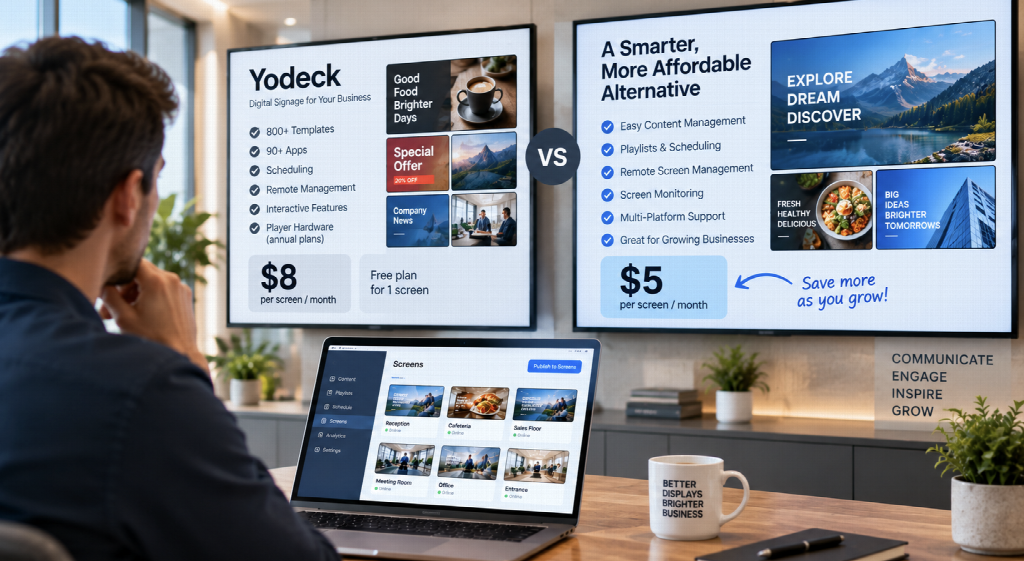
Yodeck is a capable digital signage platform. It offers hundreds of templates, a large collection of apps, scheduling, playlists, interactive features, remote screen management, and its own signage player hardware.
But what if your business doesn’t need all of that?
Many companies simply want to upload images and videos, create playlists, schedule content, update screens remotely, and know whether their displays are online.
In that situation, the most important question may not be:
“Which digital signage platform has the most features?”
It may be:
“What’s the cheapest Yodeck alternative that still gives our business the features we actually need?”
For businesses prioritizing straightforward digital signage management and lower recurring costs, BuzzBlender is worth considering.
BuzzBlender currently starts at $5 per screen per month, compared with Yodeck Basic at $8 per screen per month. As your signage network grows, that difference can become significant.
Why Look for a Cheaper Yodeck Alternative?
Price alone is not a good reason to switch software.
If your business actively uses Yodeck’s templates, apps, integrations, interactive capabilities, or included hardware, Yodeck may provide excellent value.
The question is whether you’re paying for capabilities your business actually uses.
Consider a typical restaurant with 15 screens.
The company may primarily need to upload menu graphics, play promotional videos, schedule breakfast and lunch content, and update everything remotely.
Or consider an office network with 30 screens. Its requirements might simply be company announcements, internal communications, videos, schedules, and remote screen monitoring.
In these situations, hundreds of templates and dozens of apps might be useful—but they might not be necessary.
A simpler digital signage platform can potentially reduce both software costs and administrative complexity.
How Much Does Yodeck Cost?
Yodeck currently provides a free plan for one screen, making it particularly attractive for very small installations.
For businesses managing multiple screens, Yodeck’s published USD pricing currently starts at:
| Yodeck Plan | Published Price |
| Free | $0 for one screen |
| Basic | $8/screen/month |
| Premium | $12/screen/month |
| Enterprise | $16/screen/month |
| Enterprise+ | Custom |
Yodeck’s annual plans also provide important value beyond the software subscription. Its current pricing page says qualifying annual plans include Yodeck Player hardware, with an option to use your own device and receive a stated saving.
That matters when comparing costs.
A company that needs both digital signage software and new player hardware should consider the value of Yodeck’s hardware offer rather than comparing software subscription prices alone.
What Do You Get With Yodeck Basic?
Yodeck’s $8-per-screen Basic plan is not a stripped-down product.
It currently includes all media types, more than 800 customizable templates, 90+ Essential Apps, a drag-and-drop Layout Editor, an Interactive Kiosk App, basic scheduling, and playlists.
Yodeck also supports images, video, webpages, live streams and numerous other content sources.
This is one reason Yodeck has become a popular digital signage platform.
The question for cost-conscious businesses is whether they actually need this entire ecosystem.
If your signage workflow primarily consists of:
Upload → Playlist → Schedule → Screen
then a less expensive platform may be enough.
BuzzBlender: A Cheap Yodeck Alternative From $5 per Screen
BuzzBlender takes a more streamlined approach.
Instead of trying to win a feature-count competition, the platform focuses on the core capabilities many businesses need to operate digital signage day to day.
Businesses can manage content remotely, create playlists, schedule what appears on screens, monitor displays, and operate signage from a centralized cloud platform.
BuzzBlender currently publishes a Basic price of $5 per screen per month.
That makes it particularly interesting for businesses looking for a cheaper Yodeck alternative without abandoning centralized cloud signage management.
For a broader comparison of available platforms, see our guide to Yodeck alternatives.
BuzzBlender vs. Yodeck Pricing
Here is where the difference becomes easy to understand.
Using the currently published starting prices of $5 per screen/month for BuzzBlender Basic and $8 per screen/month for Yodeck Basic:
| Number of Screens | BuzzBlender Basic | Yodeck Basic | Difference per Year |
| 1 | $60/year | $96/year* | $36 |
| 10 | $600/year | $960/year | $360 |
| 25 | $1,500/year | $2,400/year | $900 |
| 50 | $3,000/year | $4,800/year | $1,800 |
| 100 | $6,000/year | $9,600/year | $3,600 |
| 250 | $15,000/year | $24,000/year | $9,000 |
*Yodeck currently offers one screen free, so an actual one-screen deployment can use its Free plan instead of Basic. The table shows the Basic-plan rate only for consistent per-screen comparison.
These figures are simple calculations based on the companies’ currently published starting monthly rates. They do not account for enterprise negotiations, discounts, taxes, hardware, special contracts, or other commercial terms.
Nevertheless, they demonstrate why even a seemingly small $3-per-screen monthly difference matters as a network expands.
A $3 Difference Doesn’t Sound Like Much—Until You Have 100 Screens
Consider a business with 100 digital signage screens.
At $5 per screen per month:
BuzzBlender Basic = $500/month
At $8 per screen per month:
Yodeck Basic = $800/month
That’s a difference of:
$300 per month
or:
$3,600 per year.
Over three years, assuming unchanged prices and screen count, that simple difference becomes:
$10,800.
For a large company, that may be a relatively small part of the overall signage budget.
For a restaurant chain, regional retailer, gym network, school group, healthcare provider, hospitality business, or growing SME, it could be meaningful.
This is why digital signage buyers should always calculate software costs at the expected future screen count, not just the number of screens they have today.
Cheap Doesn’t Mean Choosing the Lowest Number
There is an important caveat.
The cheapest software is not automatically the cheapest digital signage system.
Businesses need to think about total cost of ownership.
Yodeck’s annual plans can include player hardware. If you need to purchase a separate media player for every screen with another platform, that additional hardware cost needs to be included in the comparison.
Likewise, a platform that costs slightly more but saves your employees several hours every week could ultimately be cheaper to operate.
So when comparing Yodeck with a lower-cost alternative, consider software subscriptions, hardware, installation, staff time, support, training, maintenance, and any additional integrations your organization requires.
Price matters, but total cost matters more.
BuzzBlender vs. Yodeck: Feature Comparison
The two platforms overlap on the essential purpose of digital signage but take different approaches.
| Feature / Consideration | BuzzBlender | Yodeck |
| Starting paid price | $5/screen/month | $8/screen/month |
| Free single-screen plan | No permanent free plan currently advertised | Yes |
| Remote content management | Yes | Yes |
| Images and video | Yes | Yes |
| Playlists | Yes | Yes |
| Scheduling | Yes | Yes |
| Screen monitoring | Yes | Yes |
| Web content | Yes | Yes |
| Portrait and landscape | Yes | Yes |
| QR-code capabilities | Yes | Yes / content capabilities available |
| Large template library | More streamlined | 800+ customizable templates on Basic |
| Apps/integrations ecosystem | More streamlined | Extensive |
| Interactive signage | Core signage focus | Strong interactive capabilities |
| Included proprietary player with annual plan | No comparable offer highlighted | Available with qualifying annual plans |
| Best fit | Businesses prioritizing core functionality and lower recurring cost | Businesses wanting a larger feature, app, template and hardware ecosystem |
This comparison highlights why there is no universal winner.
BuzzBlender’s argument is primarily simplicity and cost.
Yodeck’s argument is breadth of functionality and ecosystem.
The right choice depends on which matters more to your organization.
When BuzzBlender Makes More Sense
BuzzBlender is particularly worth considering when your digital signage requirements are straightforward.
Suppose you operate a chain of cafés.
Your marketing team creates the graphics elsewhere. You don’t need hundreds of templates inside the signage CMS because your designers already use their preferred creative tools.
What you need is a reliable way to upload those graphics, build playlists, schedule breakfast and lunch menus, push promotions to displays, and manage screens remotely.
In this situation, paying more for a larger creative and integration ecosystem may provide limited additional value.
The same logic applies to retailers that already have a design team, offices displaying internal communications, hotels publishing guest information, gyms running promotional content, or organizations that primarily use images and videos.
If you already know what you want to display, the CMS doesn’t necessarily need to be your design studio as well.
When Yodeck May Be Worth the Extra Cost
Yodeck can justify its higher Basic price when your organization uses the functionality it provides.
Its current Basic offering includes 800+ customizable templates and 90+ Essential Apps alongside its Layout Editor, interactive kiosk functionality, scheduling, playlists, and broad media support.
Higher tiers expand further into integrations, automation, data visualization, APIs, advanced scheduling, workspaces, security, roles, and enterprise administration.
Yodeck also supports an extensive range of content types and provides dedicated player hardware with qualifying annual subscriptions.
If those capabilities eliminate the need for other software or hardware in your organization, the higher subscription cost may represent good value.
Businesses should therefore avoid choosing BuzzBlender simply because $5 is lower than $8.
Choose it when the lower-cost feature set actually matches your requirements.
What About Yodeck’s Free Plan?
For a single screen, Yodeck has a major pricing advantage: it currently offers one screen free.
If you’re running one display and Yodeck meets your needs, there may be little financial reason to move purely because of subscription cost.
The economics change when you start adding screens.
At 10, 25, 50, or 100 displays, per-screen pricing becomes increasingly important.
This makes BuzzBlender particularly relevant for businesses that have moved beyond a one-screen experiment and are beginning to build a larger signage network.
Ask Yourself What Your Screens Actually Need
Before buying digital signage software, write down what your company really does with its screens.
For many businesses, the list is surprisingly short:
Upload images.
Upload videos.
Create playlists.
Schedule content.
Update screens remotely.
Know whether displays are online.
Manage different content on different screens.
If that’s your workflow, start your software search there.
Don’t begin with a list of 200 possible features and convince yourself you might need all of them someday.
Every additional capability has value only if your business actually uses it.
Consider Your Existing Hardware
Hardware can change the economics of a Yodeck alternative significantly.
Yodeck has a strong hardware proposition because its annual plans can include a Yodeck Player.
If you have ordinary displays that need external signage players, include the player value when comparing costs.
On the other hand, your business may already own compatible smart displays, Android devices, Windows PCs, or other hardware.
In that case, you may prefer software that lets you continue using your existing infrastructure rather than adopting a new hardware strategy.
BuzzBlender supports multiple platforms and is designed for businesses that want flexibility around their screen environment.
The cheapest solution is often the one that lets you reuse equipment you already own.
Think About Cost Before You Scale
One of the easiest digital signage mistakes is choosing software when you have two screens without calculating what it will cost when you have 50.
At two screens, the difference between $5 and $8 per screen is only $6 per month.
It barely deserves a meeting.
At 50 screens, the simple difference reaches $150 per month.
At 100 screens, it’s $300.
At 250 screens, it’s $750.
Digital signage software is a recurring operational cost, so screen growth magnifies small differences in per-screen pricing.
If your business expects to expand, build a simple three- or five-year cost model before committing to a platform.
Pros and Cons of BuzzBlender as a Yodeck Alternative
Advantages
The strongest advantage is the starting price. At $5 per screen per month, BuzzBlender costs less at the published Basic rate than Yodeck’s $8-per-screen Basic plan.
BuzzBlender also focuses on the functionality many businesses use every day: remote content management, playlists, scheduling, media playback, screen monitoring, and straightforward administration.
This can make it appealing to organizations that already create their content elsewhere and primarily need a system for getting that content onto screens.
Limitations
Yodeck offers a substantially broader content-creation and app ecosystem.
Businesses looking for hundreds of built-in templates, a large library of signage apps, sophisticated interactive capabilities, extensive integrations, or bundled player hardware may find Yodeck’s higher price worthwhile.
Yodeck’s free single-screen plan is also difficult to beat for a business that genuinely only needs one display.
Who Should Consider a Cheaper Yodeck Alternative?
BuzzBlender is particularly relevant for businesses where signage is important but doesn’t need to become a separate technology project.
That can include restaurants and cafés managing digital menus, retailers running promotional displays, offices sharing internal communications, hotels displaying guest information, gyms promoting memberships and classes, clinics communicating with visitors, and multi-location companies managing campaigns across several sites.
In each case, the objective is essentially the same:
Get the right content onto the right screens without spending unnecessary time or money managing the system.
Key Takeaways
Yodeck is already competitively priced and offers a substantial feature set. Its free one-screen plan and hardware-inclusive annual options can provide particularly strong value for certain deployments.
But businesses don’t all need the same signage system.
If your organization mainly needs cloud content management, playlists, scheduling, media playback, remote administration, and screen monitoring, BuzzBlender’s $5-per-screen monthly starting price makes it a compelling cheap Yodeck alternative.
At 100 screens, the simple difference between BuzzBlender Basic at $5 and Yodeck Basic at $8 is $3,600 per year based on current published prices.
That is money a business could potentially allocate elsewhere—provided BuzzBlender covers the functionality the organization actually needs.
So don’t choose digital signage software based solely on the longest feature list.
Choose the platform that delivers the functionality your screens require at a cost that still makes sense when your network grows.
For a deeper look at the market, compare the best Yodeck alternatives before making your decision.
Frequently Asked Questions
What is a cheap Yodeck alternative?
BuzzBlender is one lower-cost alternative to Yodeck for businesses that primarily need core digital signage management. BuzzBlender currently starts at $5 per screen per month, while Yodeck Basic is currently $8 per screen per month.
Is BuzzBlender cheaper than Yodeck?
At their currently published paid starting prices, yes. BuzzBlender Basic is $5 per screen per month compared with $8 per screen per month for Yodeck Basic. However, Yodeck offers one screen free and can include player hardware with qualifying annual subscriptions, so total deployment cost should also be considered.
Is Yodeck free?
Yodeck currently offers a free plan for one screen. Its paid Basic plan starts at $8 per screen per month.
How much could 100 screens cost?
Using the current published starting rates, 100 screens would equal $500 per month with BuzzBlender Basic versus $800 per month with Yodeck Basic. That’s a simple difference of $300 per month or $3,600 per year, before considering hardware, discounts, taxes, contracts, or other costs.
Why would I choose Yodeck instead?
Yodeck provides a larger built-in ecosystem, including 800+ customizable templates and 90+ Essential Apps on Basic, interactive functionality, a Layout Editor, broad content support, and optional player hardware with qualifying annual subscriptions.
Which is better, BuzzBlender or Yodeck?
It depends on your priorities. BuzzBlender is compelling when low recurring cost and straightforward signage management are priorities. Yodeck may be the stronger choice when your business values its larger template, app, interactive, integration, and hardware ecosystem.
Should I switch from Yodeck just to save money?
Not automatically. Calculate the savings and then determine whether the alternative supports everything your organization actually uses. Switching makes the most sense when you can lower total costs without losing functionality important to your operations.
Looking for a Lower-Cost Way to Manage Your Screens?
If your business doesn’t need hundreds of templates and a large app ecosystem just to manage digital signage, consider whether a simpler platform could do the job for less.
BuzzBlender starts at $5 per screen per month, providing businesses with an affordable way to manage content and screens remotely while keeping recurring costs predictable as the signage network grows.
Compare the features you actually use, calculate the cost at your expected screen count, and choose the solution that makes the most business sense.

About author


Leave a reply